EXT. RUINED CITY — NIGHT
AI Zombie Filter
Upload one photo of yourself. Get back a zombie portrait that still looks like you, with no blood and no gore. One free photo a day, no sign-up.
One person, facing the camera, eyes visible, good light.
Free · one photo a day · watermarked · deleted after 24 hours
- Free, one photo a day
- No sign-up
- Deleted after 24 hours
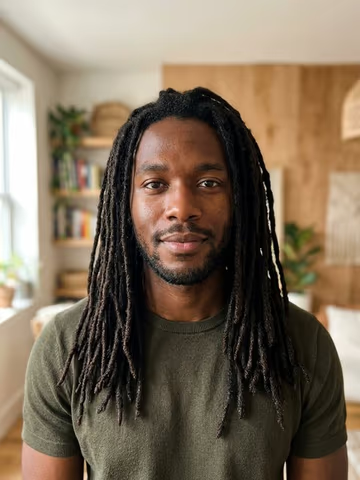
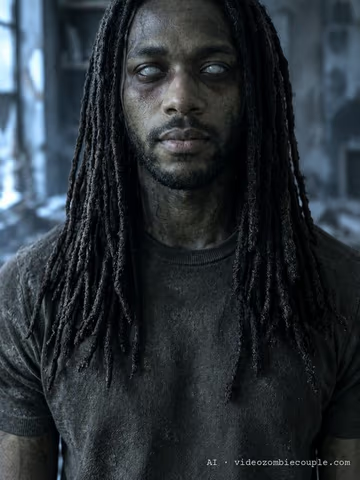
Before and after
AI-generated people, turned by this filter exactly as it runs, mark included. Your own photo keeps your face.
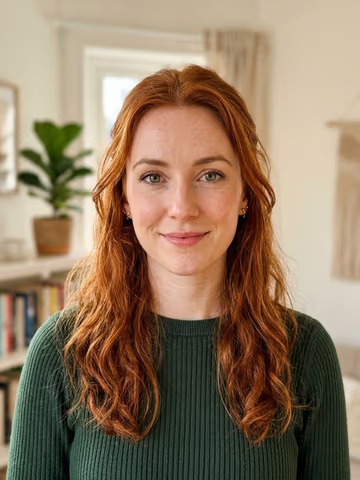
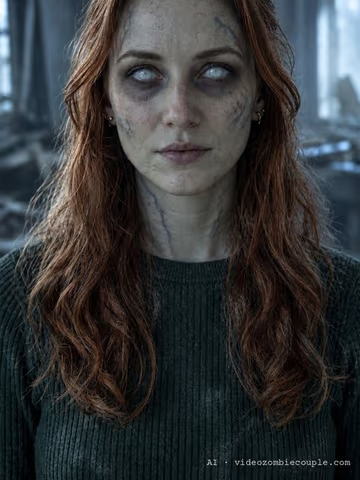
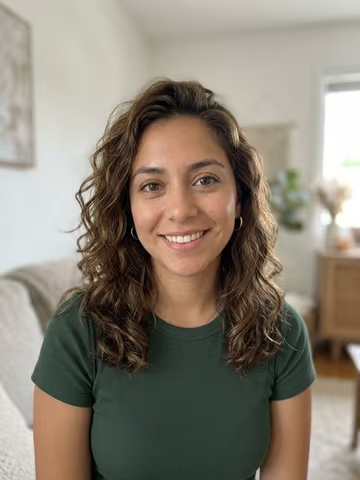
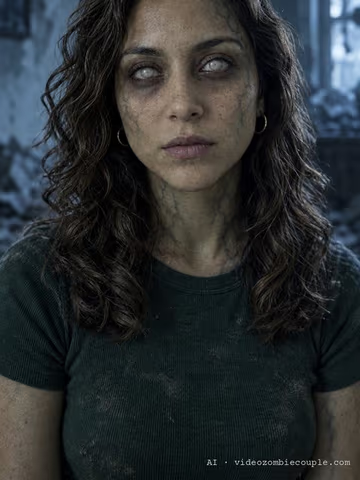
How it works
- 01
Add one photo
A clear photo of one person facing the camera, eyes visible, in good light. Tick the box to confirm it's you, or an adult who agreed.
- 02
We check it, then turn it
We check that the photo shows one adult face and nothing explicit. Then the AI keeps your face, hair and clothes and adds the zombie look.
- 03
Download your zombie photo
Download the portrait with a small AI mark in the corner. The photo you uploaded and the result are deleted after 24 hours.
What the AI zombie filter does
The AI zombie filter takes one photo of you and returns a single portrait of you as a zombie. It is not a sticker or a face mask laid over your picture. The image is generated again from your photo: your face shape, eyes, nose, mouth, hairstyle and clothes stay, and the zombie look is painted on top of them. The background becomes a ruined room in cold blue light, so the photo reads as a still from a film rather than a selfie with an effect.
Most people want two things from a zombie filter, and they pull in opposite directions. They want it to be unmistakably zombie, and they want their friends to recognise them at a glance. Push the look too far, with sunken eyes, hollow cheeks and rotting skin, and the result stops being you. Keep it too light and it looks like a bad night’s sleep. The filter aims for the middle: a grey-green tint, dark shadows around cloudy white eyes, a web of dark veins at the temples and neck, a blank stare and dust in the hair. Your bone structure is never changed.
Why it keeps your skin tone
Many zombie filters paint the same pale grey over every face. On darker skin that reads as lightening the person, not turning them into a zombie, and it makes the result look like someone else. This filter is told to keep your skin exactly as dark or as light as it is in your photo and to add the sickly tint on top. We tested this on people with very different skin tones, hair and head coverings before putting it live. Hijabs, braids, locs and glasses stay as they are in your photo.
No blood, no gore
The zombie look here is the restrained one from the zombie love story trend: sad rather than scary. There is no blood, no wounds, no bite marks, no open mouth and no teeth. That keeps the photo shareable anywhere, keeps your face readable, and keeps the result closer to good film makeup than to a horror poster.
Photos that work best
- One person, facing the camera. A head-and-shoulders photo works best. Group photos are refused, because the filter only turns one person.
- Eyes visible. Take off sunglasses and keep hair away from your eyes. The cloudy zombie eyes need your eyes to work with.
- Good, even light. Daylight from a window is ideal. Very dark photos or strong coloured light make the face harder to keep.
- Sharp and recent. A blurry or heavily filtered photo gives the AI less of your face to keep. An old photo of you as a child is refused: the filter is for adults only.
What we check before we make anything
Before the zombie photo is made, we check your upload. On our own servers we look for exactly one face and estimate the person’s age; because age estimates can be off by several years, we refuse photos where someone looks younger than 21. Our moderation provider checks the photo for nudity or sexual content, and such photos are refused. Only a photo that passes is turned into a zombie portrait. A refused photo doesn’t use up your free photo for the day.
You also confirm, before every upload, that the photo is of you or of an adult who agreed to it. Please don’t upload photos of celebrities, strangers or anyone who hasn’t said yes.
Your photo and your privacy
We use your photo once, to make your zombie portrait, and delete both the upload and the result after 24 hours. Download the result before then. Face features used for the age check exist only in memory while the check runs and are never stored, sold or shared. We never use your photos to train AI. The finished photo carries a small mark in the corner, and the file itself says that it was generated with AI, as the law in more and more places expects.
The film version
If you like your zombie photo, the film takes the idea further. With two photos, one of you and one of someone you love, we make a short vertical zombie love story: one of you has turned, the other can’t pull the trigger, they hold each other, and it cuts to a warm memory of the two of you. There is a pet version too, where your dog or cat is the one who turned. See the example films on the home page or read about the pet zombie video.
Questions
Is the AI zombie filter free?
Yes. You can make one zombie photo a day for free, with no sign-up and no payment details. The photo carries a small mark that says it was made with AI. If a photo is refused by the check, it doesn't use up your free photo.
Will it still look like me?
That's the point of it. The AI keeps your face shape, features, hairstyle, skin tone and clothes, and only adds the zombie look on top. A clear, front-facing photo in good light gives the closest result.
Does it change my skin tone?
No. The zombie look is a grey-green tint over your own skin tone, and the filter is told to keep your skin exactly as dark or as light as it is in your photo.
Is it gory?
No. There is no blood, no wounds, no open mouth and no teeth. The look is cloudy eyes, dark veins, a sickly tint and dusty clothes, closer to film makeup than to a horror poster.
What happens to my photo?
We check it, use it once to make your zombie photo, and delete both after 24 hours. We never use your photos to train AI. Face features used for the age check are computed in memory and never stored.
Why was my photo refused?
The filter only works on photos of one adult. Photos where someone looks too young, photos with more than one face or no clear face, and photos with nudity are refused before anything is made. Nothing is charged, because nothing costs money here.
Can I do two people, or my pet?
The free filter does one person. For two people, or you and your dog or cat, make the zombie love story film from two photos instead.
Now make the film
One of you has turned, the other can't let go. Two photos in, a short zombie love story out.
Make the film